
Sorax: AI Video Maker & Image
White WarriorLifestyle
2.33.00 Reviews
- Version
- 1.0.2
- Installs
- 50.00K
- Age Rating
- Mature 17+
Screenshots
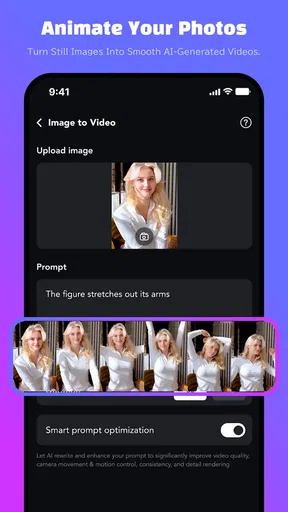
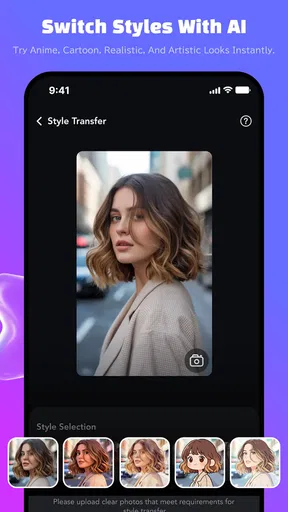

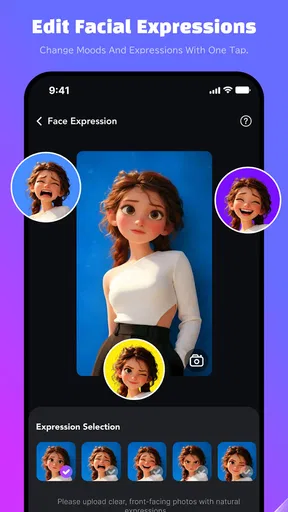
Our Review of Sorax: AI Video Maker & Image
 Analysis by Appyee
I approached Sorax: AI Video Maker & Image as a quick creative tool rather than a full editing studio. Its promise is straightforward: turn photos into cinematic-looking animations, add video effects, and experiment with visual styles with help from AI. That makes it interesting for people who want a result that feels more alive than a static image, but who do not want to learn a complicated timeline editor first.
My overall impression is mixed. The concept is appealing, and the app sits in a useful space between ordinary photo editors and advanced video software. At the same time, the low average rating of 2.3 from around 36 ratings suggests that the experience has not worked smoothly for everyone. I would treat it as a tool to try for specific creative ideas, not as an automatic replacement for every photo or video app on your phone.
What to consider before choosing Sorax
The first question is what you actually want to make. If your goal is a short animated portrait, a stylized social post, or a visual experiment from an existing photo, this app’s focus makes sense. If you need precise cuts, carefully timed captions, layered audio, or dependable control over every frame, a conventional mobile video editor may be a better match.
I also think your tolerance for experimentation matters. AI-assisted creation often involves trying a prompt, style, or source image and judging the result rather than setting every movement manually. That can be fun when you want surprising ideas. It can also be frustrating when a face, pose, object, or background does not behave as you expected.
Because Sorax is listed as a mature app for people aged 17 and over, I would not choose it for a child’s creative project. That age guidance is also a reminder to think carefully about the photos you upload and the kinds of visual effects you create. For personal portraits, family pictures, or images of other people, I would use material I have permission to edit and share.
The app is free to install, but it includes purchases ranging from $1.99 to $99.99 per item. That changes the decision considerably. A free starting point is useful, but I would not assume that every attractive effect or generation option is included without checking the purchase screen inside the app. My advice is to explore the basic workflow first and decide whether its results are good enough to justify spending anything.
How I would judge the experience
I would use four practical tests. First, can I get from a photo to a usable visual without confusion? Second, do the animations look intentional rather than merely distorted? Third, can I repeat a style across several images? Finally, does the result save me time compared with making the same idea in a normal editor?
That last test is important. An AI effect is not automatically useful just because it looks dramatic in a preview. If I need to redo the same image repeatedly, correct awkward movement, or move between several separate apps to finish the post, the convenience disappears. Sorax makes the most sense when its automated approach reduces work rather than simply adding another place to experiment.
The current version is 1.0.2, so I would keep expectations realistic. A relatively early version can feel focused, but it may also have rough edges in navigation, output consistency, or the number of available creative controls. I would judge it by whether the central photo-to-animation idea works for my needs, not by expecting the depth of a mature desktop editor.
A realistic everyday workflow
Imagine I have taken a portrait during a trip and want something more interesting than a normal photo for a private message or a short social post. I could select the image, try a cinematic animation style, preview the movement, and compare it with a more restrained effect. If the face remains recognizable and the motion supports the mood of the picture, I have a quick piece of content without building a project manually.
The useful habit here is to keep the original photo untouched. I would make a copy before experimenting, especially with images that matter to me. I would also test a clear, well-lit picture before using a crowded scene. That is not a guarantee of a better result, but it gives the visual system less ambiguity to interpret and makes it easier to tell whether the effect itself is working.
For a small business owner, the same workflow could help create a handful of visual variations for a seasonal post. I would still review every result before publishing. An AI-generated movement can draw attention, but an odd expression or distracting background motion can make a polished brand image look careless.
Where Sorax is most convincing
The strongest part of Sorax is its narrow creative identity. Instead of asking me to learn a large collection of editing tools, it points toward cinematic photo animation, video effects, and visual styles. That focus can be valuable when I already know the mood I want but do not know how to create it manually.
I see particular value for people who collect photos but rarely turn them into videos. A static image can feel finished and forgotten; a short animation gives it a different role. Travel memories, portraits, fashion images, artwork, and mood boards are all natural candidates. The app is also appealing for someone who wants to test an idea quickly before investing more time in a polished edit elsewhere.
Another strength is the possibility of using it as an idea generator. I would not always expect the first output to be the final one. Instead, I could use a surprising animation to discover a direction: a slower mood, a more dramatic transition, or a style that suggests how to edit the original image manually. In that role, the app is less like a complete production suite and more like a visual sketchbook.
The best reason to try Sorax is speed of experimentation, not precision editing. That distinction helps set the right expectations. If I want to explore several moods from one picture, an AI-focused tool can be more inviting than a traditional editor with menus, tracks, and adjustment panels.
Three practical techniques that improve the decision
My first technique would be to compare the same source image in two very different styles rather than testing many similar effects. This quickly reveals whether I prefer Sorax for subtle movement or for bold transformations. It also prevents me from spending time on tiny variations that do not change the final use of the image.
Second, I would prepare source images according to the intended viewing size. A picture that looks fine as a small phone preview may expose strange edges or facial changes when enlarged. I would check the result at the size where I plan to share it, not only inside the creation screen. This is a simple way to avoid mistaking a flashy preview for a finished asset.
Third, I would create a small personal style test before paying for anything. I would use a portrait, a landscape, and an image with several objects, then compare how consistently the app handles each one. This matters because a tool that works beautifully for portraits may be much less useful for scenery or busy compositions. The right purchase depends on the type of images I actually make, not on one impressive example.
These tests also help answer a common concern: does the app replace a normal editor? In my view, no. It can produce a starting point or a distinctive effect, while a standard editor remains better for trimming, arranging, adding text, balancing sound, and controlling the final sequence. I would use Sorax before or alongside those tools, not necessarily instead of them.
Who will get the most from it
Sorax is a good candidate for casual creators who want movement without studying video production. It may suit social media users, photographers looking for quick variations, and anyone who enjoys visual experimentation. It is also a reasonable option for people who find traditional editing interfaces intimidating and would rather begin with a photo and a style choice.
I would be more cautious if I were working on client content, a product launch, or a project where the same look must be reproduced exactly. AI results can be attractive while still being difficult to control consistently. In those situations, a conventional editor with explicit settings is usually the safer foundation.
Where another category may fit better
The most obvious alternative is a traditional mobile video editor. This category is better when I need a predictable sequence, exact timing, multiple layers, captions, music, or detailed corrections. It takes more effort to learn, but that effort buys control. Sorax is more convenient for discovering a look; a timeline editor is more dependable for assembling a finished story.
A second alternative is a standard photo editor with filters and motion-style effects. That option may be better for someone who mostly wants color correction, cropping, retouching, or a consistent visual treatment across a photo collection. Sorax is more specialized around animation and cinematic presentation, so it may feel unnecessary if the image itself only needs cleanup.
There is also a place for dedicated AI image tools. These may be preferable when the main goal is generating or changing still artwork rather than animating a photograph. Sorax is more relevant when I want the source image to become a moving visual. Choosing between the two depends on whether motion or image creation is the central task.
I would not pick Sorax simply because AI sounds more advanced. A manual editor can produce a less surprising result, and that is often exactly what a user needs. For a birthday montage, a business announcement, or a video with carefully timed information, predictability may matter more than novelty.
Limitations that affect the choice
The rating gives me one reason to approach the app carefully. An average of 2.3 is not proof that every user will have a poor experience, but it is a meaningful warning to test the workflow before committing to purchases. With only a small group of ratings, the number is not a complete technical verdict, yet it still tells me not to treat the app as a universally polished solution.
AI effects can also create a gap between intention and result. A cinematic label may suggest professional movement, while the actual output may feel exaggerated or unsuitable for the original photo. The more specific my visual requirements are, the less comfortable I would be relying on automation alone.
Another trade-off is creative repetition. If I use the same fashionable effect frequently, my posts may begin to look alike. I would counter that by choosing source images with a clear purpose and using animation only when it adds something. Sometimes a restrained result is stronger than the most noticeable effect.
The purchase range deserves attention as well. A low-cost experiment and a high-cost commitment are very different decisions. I would avoid buying several items at once. Instead, I would identify one workflow I expect to use repeatedly, confirm that the free experience is suitable, and then consider the smallest purchase that addresses that need.
What switching to Sorax really involves
Moving from a normal photo editor to Sorax is not only a change of interface; it is a change in how I make decisions. In a manual editor, I decide how each adjustment behaves. Here, I spend more time selecting the right source image, judging the style, and deciding whether the generated motion feels natural.
That can reduce the learning barrier, but it does not remove the need for taste. I still have to choose images that support the intended mood, reject weak outputs, and think about where the result will be viewed. The app may handle part of the production work, yet the final quality still depends on my selection and review.
The cost of switching is lowest if I only want occasional experiments. I can keep my usual editor for serious projects and use Sorax when I want a quick animated variation. The cost is higher if I expect one app to handle every stage from photo correction to final video delivery. In that case, I may end up recreating work in another editor, which reduces the time saved.
I would also keep a simple folder workflow: original images in one place, Sorax experiments in another, and approved results separated from drafts. This matters because AI experimentation can produce several versions that look similar at first glance. Naming files by subject and intended use makes it easier to find the version I actually want later.
For privacy-conscious users, the sensible approach is to begin with non-sensitive images. I would avoid testing the app with confidential documents, private identification, or photographs I would not want processed by a creative service until I had personally reviewed the app’s current terms and behavior. That is good practice for any AI media tool, not a claim about a specific policy.
The app is available for Android devices running version 7.0 or later, which keeps the technical entry point fairly broad. Still, compatibility is not the same as identical performance. I would expect the smoothness of previews and exports to depend on the particular phone, so I would test it on the device I plan to use rather than assuming that an older compatible handset will feel as responsive as a newer one.
My recommendation after weighing the trade-offs
I would recommend Sorax to a curious creator who wants to animate photos, try cinematic styles, and accept a little trial and error. Its free entry point makes a small experiment reasonable, and its focus is clearer than that of a general-purpose editor. The developer, White Warrior, has positioned it as a lifestyle app built around AI-assisted visual creation, and that makes it most useful for personal expression rather than highly controlled production.
I would not recommend paying immediately. I would first test several different image types, inspect the results outside the preview, and decide whether the output looks genuinely usable. The mature age guidance, in-app purchase range, and modest rating all make a careful trial more sensible than an impulse purchase.
If I wanted exact editing, dependable repetition, or a complete video project with detailed timing, I would choose a traditional editor instead. If I only wanted filters and basic photo improvements, a regular photo app would probably be simpler. Sorax earns its place when the specific need is to turn still images into more expressive, animated visuals.
After that trial, the decision is fairly clear. Keep it as a creative side tool if it produces effects that fit your photos and saves you time. Remove it or leave it unused if the results feel artificial, the workflow becomes repetitive, or the purchase prompts outweigh the value. Sorax is worth exploring for visual ideas, but it should be judged by the quality of your own finished images, not by the appeal of AI alone.
Verdict
Strengths of Sorax: AI Video Maker & Image
- Creates videos from text or images with minimal editing experience.
- AI-generated visuals can help turn simple ideas into engaging content.
- Useful for social media creators needing fast video concepts.
- Supports creative experimentation with different visual styles.
- Reduces the need for advanced video-editing software or skills.
Limitations of Sorax: AI Video Maker & Image
- AI results may vary and sometimes require several attempts.
- Some features or exports may be limited behind a subscription.
- Generated videos can look generic without detailed prompts.
- Processing times may increase for longer or more complex projects.
- Privacy terms should be checked before uploading personal images.
Similar Picks in This Category
View All
SmartThings
Samsung Electronics Co., Ltd.4.6

Google Home
Google LLC4.0

Pinterest4.2

Astrotalk - Talk to Astrologer
Astrology & Horoscope4.7

My Verizon
Verizon Consumer Group4.5

Samsung Wallet (Samsung Pay)
Samsung Electronics Co., Ltd.4.1
Frequently Asked Questions
What is Sorax: AI Video Maker & Image, and what can I use it for?
Sorax: AI Video Maker & Image is an artificial intelligence creative app designed to turn text prompts, photos, or other ideas into visual content. Depending on the available tools and your subscription, you can create AI-generated images, animated clips, stylized videos, and social-media-ready content. It may be useful for experimenting with concepts, making short posts, producing imaginative artwork, or creating visual material without advanced editing skills.
Is Sorax: AI Video Maker & Image free to download and use?
The app may be available to download at no initial cost, but free access does not necessarily include unlimited generations or every editing feature. AI image and video creation commonly uses credits, limits, advertisements, or premium plans. Before creating a large project, check the current in-app pricing, credit system, renewal terms, and which tools are restricted to subscribers, since these conditions can change with updates.
Does Sorax require an internet connection or a powerful device?
Because AI generation is generally processed through online servers, Sorax is likely to require a stable internet connection for creating images and videos, even if some basic browsing or editing options work offline. Generation speed and results can also depend on your device, operating-system version, available storage, and server demand. A newer phone with sufficient free space should provide a smoother experience.
Can I use Sorax-generated images and videos commercially?
Commercial use should not be assumed automatically. The rights attached to content created with Sorax can depend on its terms of service, the plan you use, the source material you upload, and whether the result includes recognizable people, brands, copyrighted characters, or third-party assets. Review the app’s current licensing rules before using generated content in advertising, client work, merchandise, or monetized social-media projects.
Is Sorax: AI Video Maker & Image safe for uploading personal photos?
Before uploading personal photographs, read Sorax’s privacy policy and review how images, prompts, and generated results are stored, processed, or shared. Avoid submitting sensitive documents, private family photos, confidential business material, or images of other people without permission. Also check whether uploaded content may be retained for service improvement and whether the app provides controls for deleting your data or account.
